Photo Attorney: Help! I've Been Infringed!
Useful information
Friday, May 29, 2009


Wednesday, May 27, 2009
Looking for photography students - wedding pics!
I am looking for 1 to 2 students to take pictures of my wedding on the 27th of June. I will have other guests taking photos, but wanted people who have taken Steve's class that would keep outdoor lighting in mind. Please email me at fndlb2@uaf.edu as I check that email more often. This is a great opportunity for practice!!! I will provide a cd or jump drive with which to copy the photos. They do not need to be edited, if it helps save time.
Thanks all!
And thanks to Steve for letting me post this!
Debbie
Thanks all!
And thanks to Steve for letting me post this!
Debbie
Tuesday, May 26, 2009
Thousand Portraits - a set on Flickr
Thousand Portraits - a set on Flickr
This is a cool idea, it would be a good project for a class or just a group of people.
This is a cool idea, it would be a good project for a class or just a group of people.
lens culture: Laura Domela
lens culture: Laura Domela
Check this out, our state!!!
Check this out, our state!!!
| Everyone My Brother Knows in Girdwood, Alaska |
Monday, May 25, 2009
Street Photography Techniques « NEW YORK PHOTOGRAPHER’S BLOG
Street Photography Techniques « NEW YORK PHOTOGRAPHER’S BLOG
An accurate in-depth description of street photography technique! I even learned some things:)
An accurate in-depth description of street photography technique! I even learned some things:)
Thursday, May 21, 2009
B: Shoot first, ask questions later
B: Shoot first, ask questions later
Excellent photographs and excellent ideas. The relationship between projects or ideas and actual photographs is complex and intricate.
Excellent photographs and excellent ideas. The relationship between projects or ideas and actual photographs is complex and intricate.
Tuesday, May 19, 2009
» Famous Photos - Famous Photo - World’s famous photos
» Famous Photos - Famous Photo - World’s famous photos
This is kind of interesting. A good RSS feed.
This is kind of interesting. A good RSS feed.
Saturday, May 16, 2009


Friday, May 15, 2009
Say goodbye to criticism, technology is here to rescue us! - Rangefinderforum.com
Say goodbye to criticism, technology is here to rescue us! - Rangefinderforum.com
This is depressing on so many levels. I hate photo contests! I hate group judging. All this does is create a computerized photo judge!!! It is computerized insecurity!
What is crucial in lasting photography is to develop an internal standard that is consistent with your values and your view of life and that expresses who you are. Developing the courage of your vision is identical to developing confidence in your unique identity.
This is depressing on so many levels. I hate photo contests! I hate group judging. All this does is create a computerized photo judge!!! It is computerized insecurity!
What is crucial in lasting photography is to develop an internal standard that is consistent with your values and your view of life and that expresses who you are. Developing the courage of your vision is identical to developing confidence in your unique identity.
Tuesday, May 12, 2009
CIOS 258 News!!!! I am stopping teaching!
I have decided to stop teaching! I do not want to make the time commitment of four months out of the year to teach. This spring I wanted to go to Fur Rondy in Anchorage to take some photographs, but I could not because of teaching. I have been teaching every year for twenty years and it was time to stop. I will be using this web log to share photography tools and resources, I will keep this web log alive. All my material will be online also for anybody to use in their classes or to share with others.
I really enjoy teaching photography, but for now I want to do photography more then teach photography.
Steve
I really enjoy teaching photography, but for now I want to do photography more then teach photography.
Steve
Thursday, May 07, 2009
Editing and Enhancing Your Photograph: Sharon Gutierrez
B&W Filtered in Picasa. The original didnt look so "dirty"... I origionally took the picture to view something 'ugly' in the 'pretty' snow because I enjoy the contrast. Adding this particular filter gave it a grungy dirty look.

I "warmed up" the colors in this picture to create a warm inviting picture. I used the "warmify" tool in Picasa.
.JPG) This is the original, it is a little overdeveloped to begin with, but I still enjoyed the quality of the picture.
This is the original, it is a little overdeveloped to begin with, but I still enjoyed the quality of the picture..JPG)
I used the Sepia filter in Picasa. This gave the picture an 'old fashioned' look, antique if you will.

Week 5: Assignment Sharon Gutierrez

This is the assignment where we cropped the picture to change the intent of the picture... The original phtograph shows a man passed at out a picnic table downtown. You can see lots of the background and it really shows the envornment, as harsh as it is, in which he is oblivious.
The second picture is cropped to just show the man, to me it focuses on the humanity of the person alone. The background is not so important in the second picture, but even without the snow and harsh weather you feel the sense of 'hopelessness' or not caring in the cropped version.

The second picture is cropped to just show the man, to me it focuses on the humanity of the person alone. The background is not so important in the second picture, but even without the snow and harsh weather you feel the sense of 'hopelessness' or not caring in the cropped version.

Tagged Photos in Picassa
This is my album from this class. The pictures are tagged per Assignment 1 from April 18th - April 25th.
Sharon Gutierrez : Week 3 - First Assignment
Incorrect White Balance/ Wrong Color
Motion Blurr/Totally Blurry
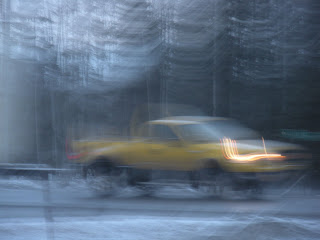
Subject Blur/ Partially Blurry

Depth of Field/Wrong plan of Focus

Over Exposed / Washed Out

Inder Exposure/Too Dark


Motion Blurr/Totally Blurry

Subject Blur/ Partially Blurry

Depth of Field/Wrong plan of Focus

Over Exposed / Washed Out

Inder Exposure/Too Dark

Wednesday, May 06, 2009
First assignment - Sharing Photographs
Since I already shared my rain photographs here is a link to my museum pictures. I joined the "Rain" group on flickr! :)
2nd Assignment - Editing and Enhancing
Original Photograph(it's a yoga mat)

This is using the black and white tool in picasa. I think it looks alright, but I think the color really adds to the original photo.

For this one I used the tint tool in picasa. I think it is neat that I can change the whole color of the picture, and this is the kin d of picture you can make any color you want. (It's still best green though!)
This one was done using the soft focus. I think this is a good tool to use if you want to focus in on one thing in the picture. (Like the leaf here).

This is using the black and white tool in picasa. I think it looks alright, but I think the color really adds to the original photo.

For this one I used the tint tool in picasa. I think it is neat that I can change the whole color of the picture, and this is the kin
 d of picture you can make any color you want. (It's still best green though!)
This one was done using the soft focus. I think this is a good tool to use if you want to focus in on one
 thing in the picture. (Like the leaf here).
1st assignment - Editing and Enhancing
I looked up cropping technique and how to enhance a picture through cropping. Here is the link I used.
Original Picture

Edited Picture

Original Picture

Edited Picture

Third week - First Assignment
Incorrect Photos
1. Subject blur / partially blurry photograph

2. Motion Blur/Totally blurry photographs

3. Depth of Field / Wrong plane of focus

4. Over exposure / Washed out

5. Under exposure / Too Dark

6. Incorrect white balance / Wrong color

1. Subject blur / partially blurry photograph

2. Motion Blur/Totally blurry photographs

3. Depth of Field / Wrong plane of focus

4. Over exposure / Washed out

5. Under exposure / Too Dark

6. Incorrect white balance / Wrong color

Tuesday, May 05, 2009
artistic effects in PSP
Original

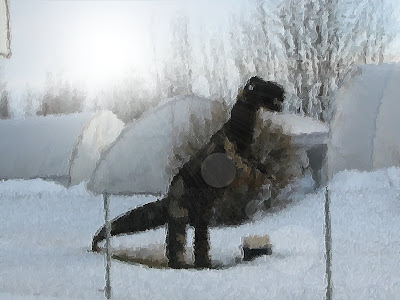
here all i did was bring up the picture in PSP and clicked on the effects tab and scrolled down to artistic effects and chose brush strokes and that's it, couldn't be easier. now it looks like it's a painting, and I also added some sunlight.
here are lots of links to PSP tutorials
http://www.pixel2life.com/tutorials/paint_shop_pro/photo_editing/
PSP can be bought but you can also find it on the net for free,

here all i did was bring up the picture in PSP and clicked on the effects tab and scrolled down to artistic effects and chose brush strokes and that's it, couldn't be easier. now it looks like it's a painting, and I also added some sunlight.

here are lots of links to PSP tutorials
http://www.pixel2life.com/tutorials/paint_shop_pro/photo_editing/
PSP can be bought but you can also find it on the net for free,
Subscribe to:
Comments (Atom)